Available on every plan · Updated 22 October 2026
Also asked as: “charge VAT” · “add tax to my prices” · “tax settings” · “tax exempt products” · “my sales figures dropped” · “tax on international orders”
The one thing to understand before you touch this: your prices already include tax. Turning tax on does not add a percentage on top of what shoppers pay. The price stays exactly where you set it, and what changes is that the tax portion inside it is now recorded on each order and shown to the shopper.
This is how retail prices work in Nigeria, and it is the safest way round: you can turn tax on without your online store suddenly getting more expensive.
Whether to turn it on at all
That is your decision and nobody else's. The platform never decides that your business is registered to charge tax, because the rules about who must register turn on your turnover and on your own circumstances. If you are registered, turn it on. If you are not, leave it off, which is where every store starts.
What each setting does
Go to Settings → Taxes. Tax collection has the switch and the rate; Tax invoices has what prints on the documents your customers get.
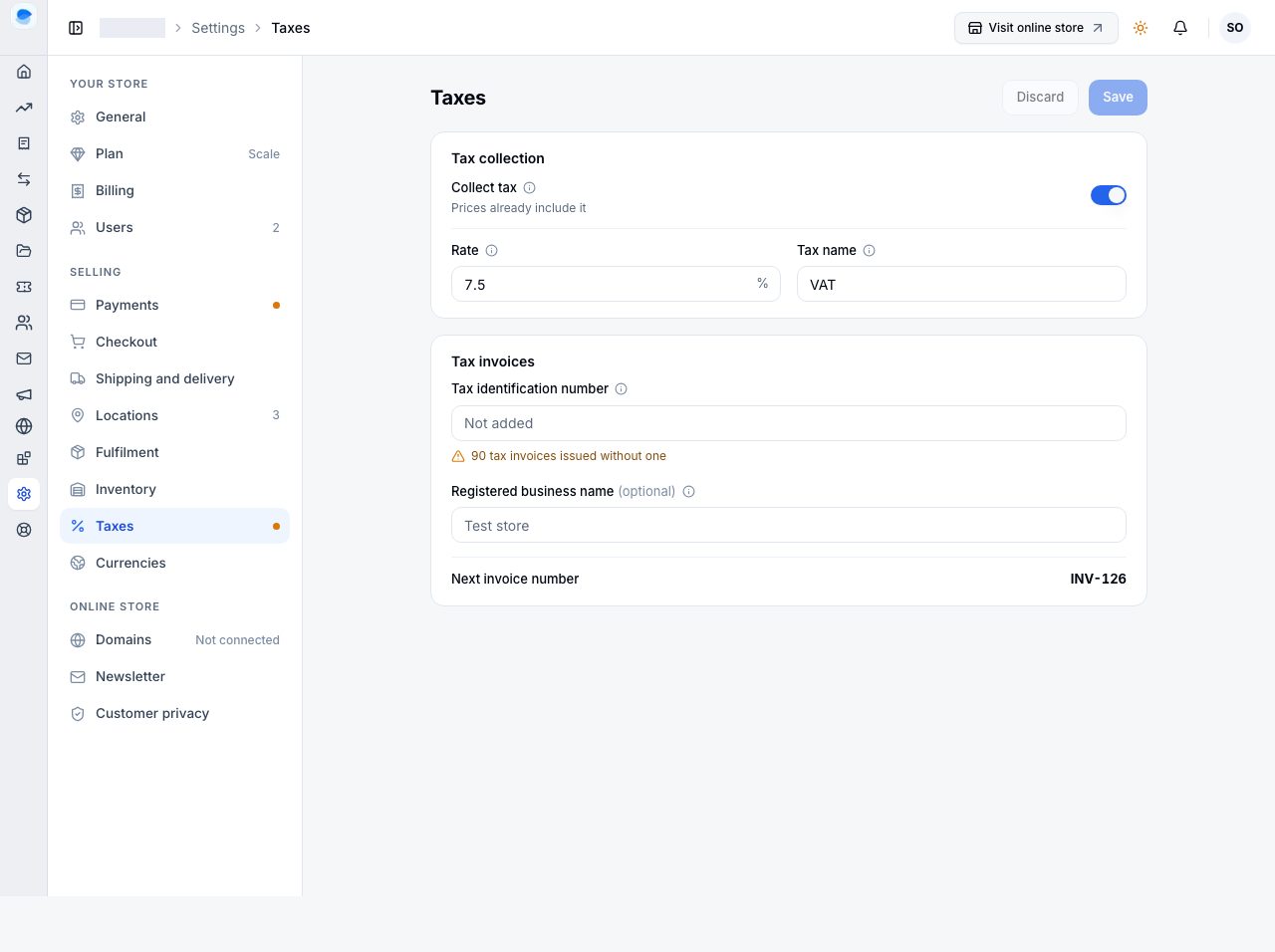
- Collect tax: on, and your prices already include it.
- Rate, as a percentage. Nigeria's VAT rate is 7.5 at the time of writing; check the current rate for yourself rather than taking a number from a help page.
- Tax name: what shoppers see it called. VAT in Nigeria; other countries say GST or Sales tax. This word appears beside the total, as "Includes VAT".
- Tax identification number. Printed on the tax invoices your customers download, never shown on your online store. Leave it blank and those invoices go out incomplete, which in most places means they are not valid tax invoices: the page counts how many went out without one, and a dot beside Taxes in the Settings list says so.
- Registered business name (optional). The name of the registered business, which is often not the name over the shop. Leave it blank if they are the same.
- Next invoice number: the number the next tax invoice will carry.
Choose Save.
Three consequences, stated plainly
1. Nothing your shoppers pay changes. A product priced at a given figure is charged at that figure before and after. The cart, the checkout and the receipt gain one line under the total saying how much of it is tax.
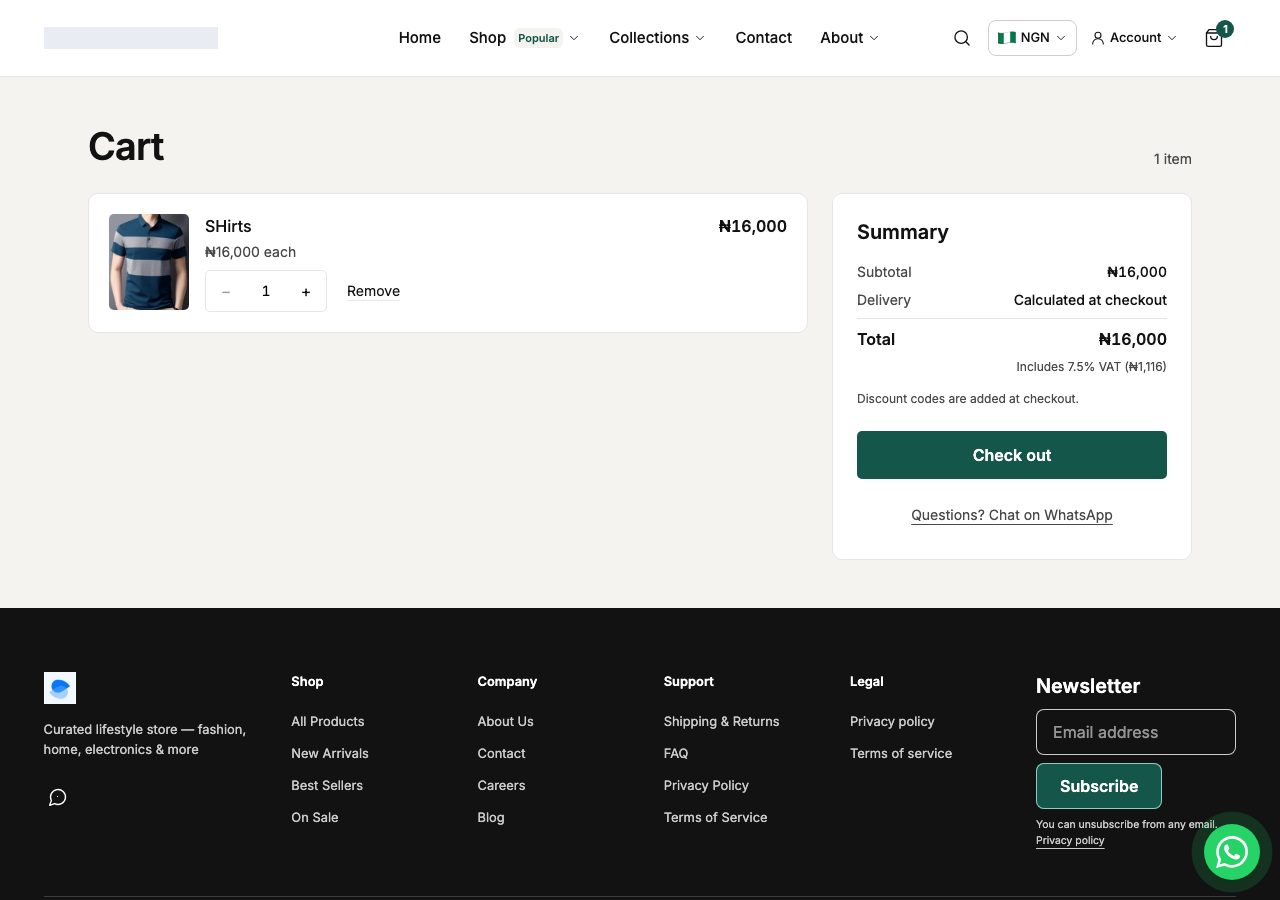
Note what that line does and does not say. The subtotal is unchanged, the total is unchanged, and the tax is quoted out of the total rather than added to it. If you ever see a tax figure being added to a total on your store, that is a fault, and we want to hear about it.
2. Your sales figures in Analytics get smaller, and your payouts do not. From the day you turn tax on, sales are reported without the tax in them, because that part was never yours to keep. The money that reaches your bank is exactly the same. Orders placed before you turned it on are not restated: an order keeps the rate it was charged at, for ever, which is what makes a receipt from six months ago still correct after you change your rate.
3. Orders shipped abroad are zero-rated. Tax applies to orders delivered inside your own country. An order going to another country records no tax at all, and the shopper still pays the same price. Your cart may show a home-country tax line before the shopper has given an address, because a cart cannot know where the order is going; it corrects itself when the order is placed.
Products that carry no tax
Some goods carry no tax where you sell. In Nigeria that typically includes basic food items, medical and pharmaceutical products, and books and educational materials.
Once your store has a rate, every product's page gains Charge tax on this product, under Pricing in Compare-at price, cost and tax, on by default. Turn it off for exempt goods.
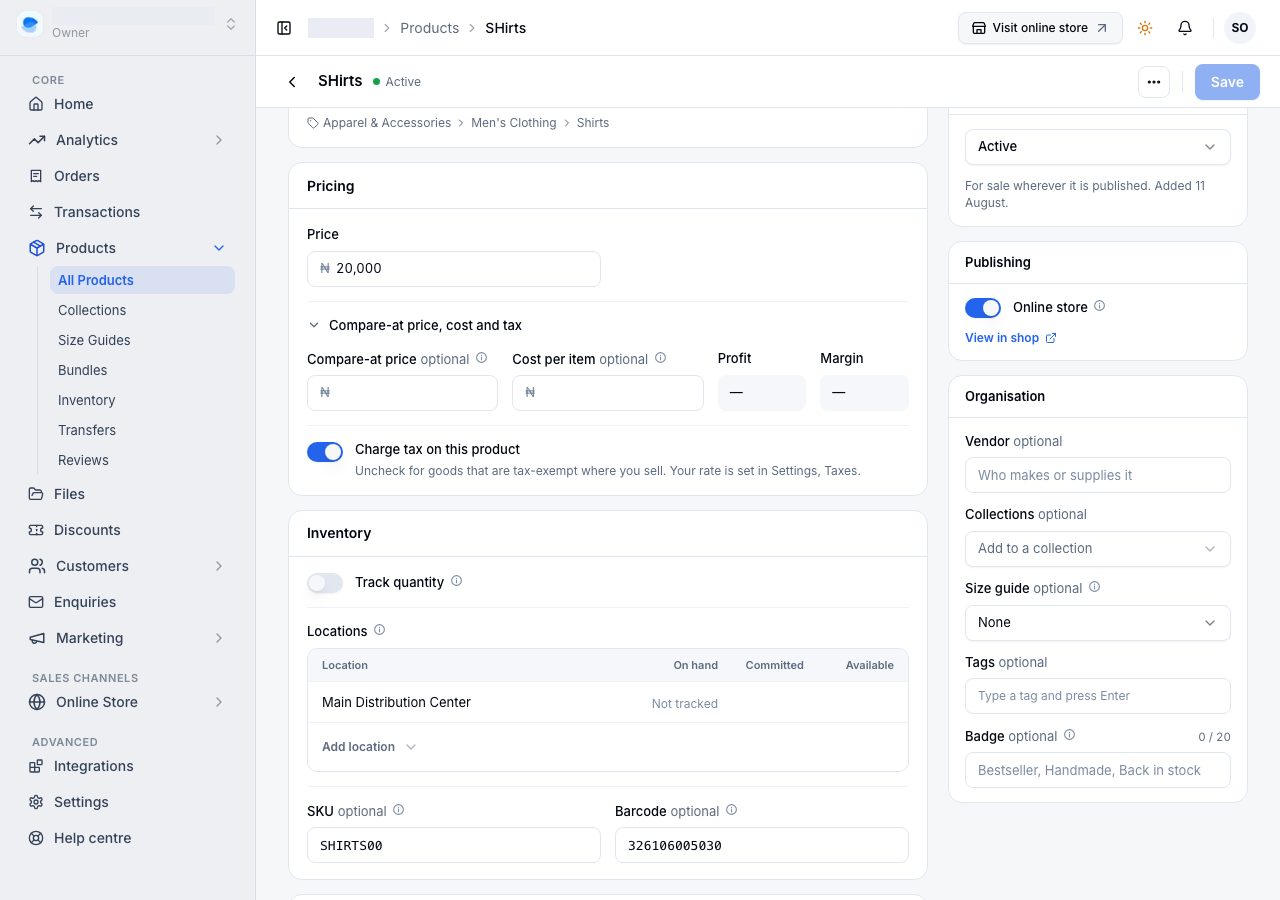
A basket that mixes taxable and exempt goods works out correctly: the tax is worked out on the taxable part, and the delivery fee and any discount are split between the two in proportion. A basket with nothing taxable in it records no tax.
The control does not appear at all when your store has no rate, because there is nothing to decide until then.
What this does not do
- It is not tax advice, and nothing here auto-enables. Whether you must register, at what rate, and what is exempt, are questions for you or your accountant.
- One rate per store. There is no way to set different rates for different products or different states.
- Prices are tax-inclusive only. There is no mode that shows prices without tax and adds it at checkout.
- It does not file anything. Your Taxes report tells you what you collected; submitting it is yours to do.
If it does not work
- Turning tax on made your prices look wrong. It should not have changed a single price. If a total went up, stop and tell us with the order number.
- The tax line does not show to a logged-out shopper. Refresh the page once. If it stays missing, tell us which page.
- Save is greyed out. The rate is empty or is not a number between 0 and 100.
- A product has no Charge tax on this product control. Your store has no rate, so there is nothing for the control to decide. Set a rate and it appears on every product.
- Analytics dropped the day you turned it on. That is the second consequence above, working as described. Your payouts did not change.
Email support@shoponent.com with your store name if anything here does not match what you see. We read and answer every message.