Available on every plan · Updated 22 October 2026
Also asked as: “newsletter list” · “export email list” · “mailing list” · “who subscribed” · “subscribe a customer” · “add someone to my email list” · “unsubscribe someone” · “pause a subscriber” · “where are my subscribers”
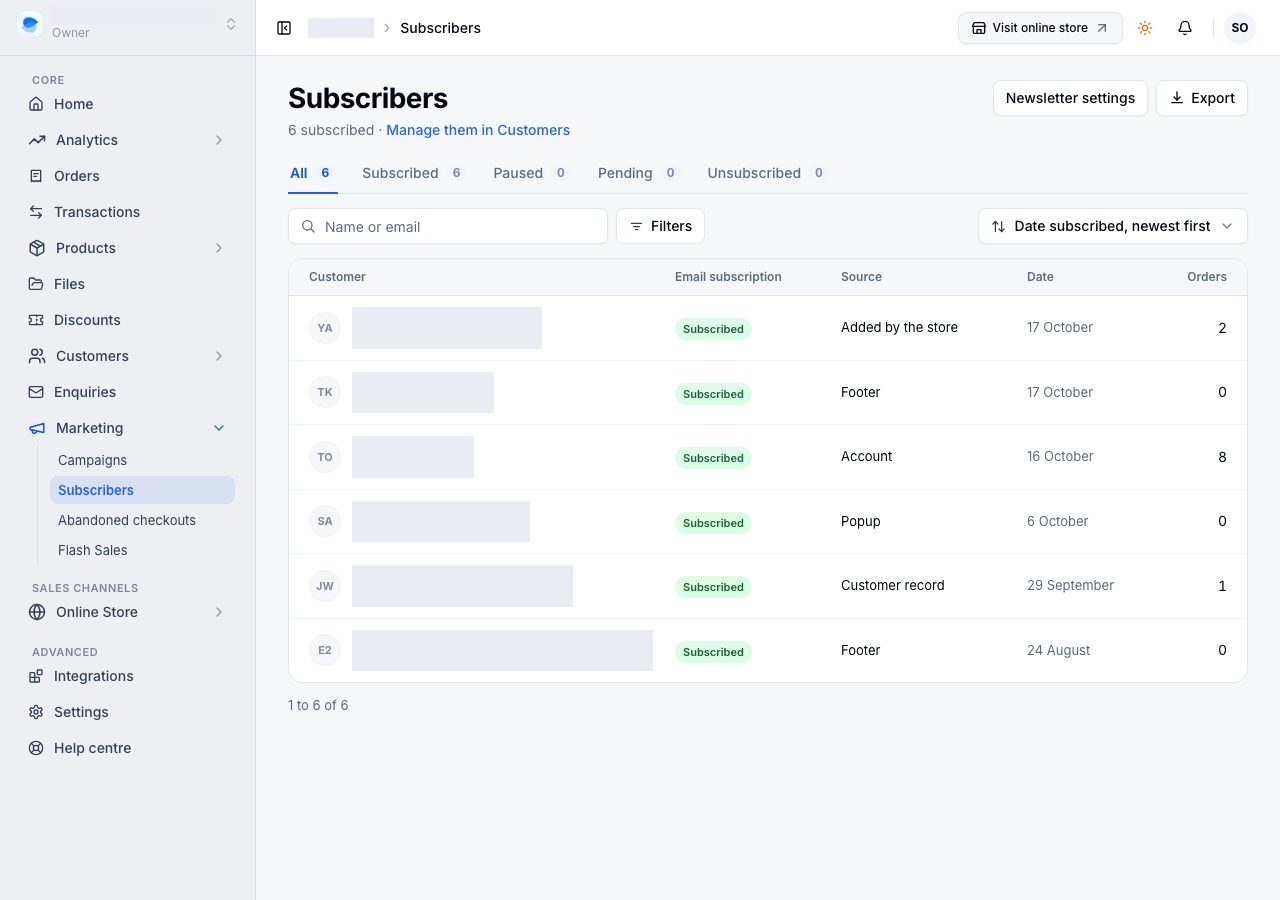
Marketing → Subscribers shows everyone who gets your emails, with where and when they joined. It is the list to look at and export: everyone on it is one of your customers, and anything you change about a person, you change on the customer.
The list
The views across the top are All, Subscribed, Paused (still subscribed, left out of your campaigns until you resume them), Pending and Unsubscribed, each with its count. The line under the title says how many are subscribed; a campaign's own count, on Campaigns, leaves out addresses your store cannot email, such as a walk-in's placeholder.
| Column | What it says |
|---|---|
| Customer | their name and email; the row opens them |
| Email subscription | Subscribed, Paused, Pending or Unsubscribed |
| Source | where they joined: Checkout (the tick box), Popup, Footer, Signup section, Account signup, Account (their account's profile), Added by the store, or Customer record (marked as accepting marketing on their customer before subscribers and customers became one list) |
| Date | when they joined, or when they left |
| Orders | how many orders they have placed |
Search finds a name or an email, Filters → Source narrows to where people joined, and the sort puts the newest or the oldest first.
Double opt-in is always on. Someone who signs up on your online store is Pending until they press the link in the email your store sends them. They are not a customer yet, so their row opens nothing, and nothing is sent to them. See Collect newsletter signups.
Export downloads the view as a CSV, on every plan.
Pausing, unsubscribing or adding someone
These happen in Customers, where every subscriber is a customer: Manage them in Customers, under the title, opens Customers → Email subscribers.
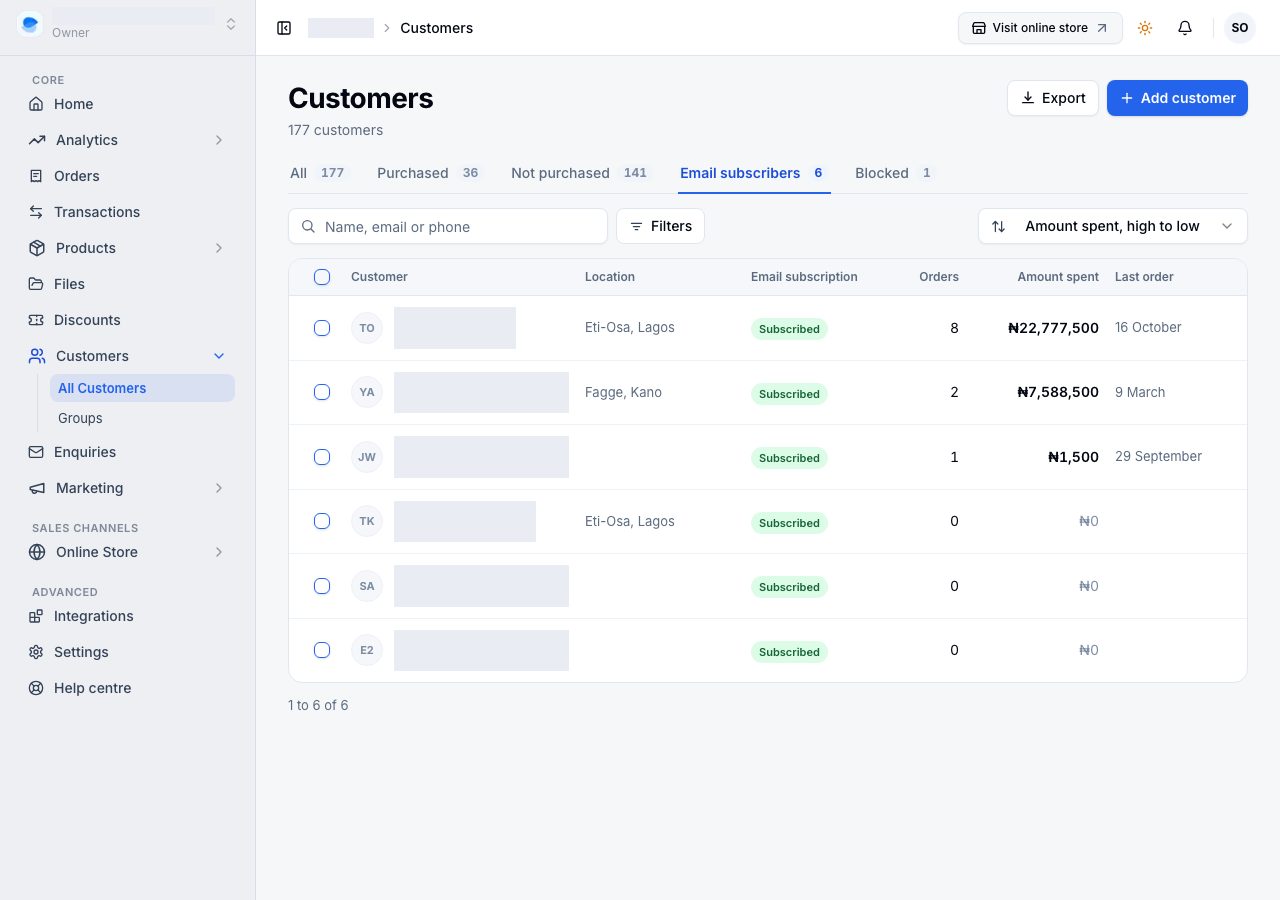
- Tick people and choose Email marketing → Pause, Resume or Unsubscribe. Pause is for someone who asked for a break rather than to leave.
- Filters → Email subscription there finds Subscribed, Paused, Pending, Unsubscribed or Not subscribed customers, with a count beside each.
When someone asks you for your emails, in your shop, on the phone or by message, you can add them:
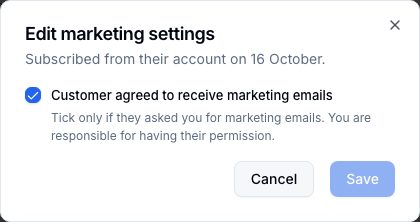
- On a new customer, tick Customer agreed to receive marketing emails under Email marketing in Add customer.
- On a customer you have, open them and choose Edit on Email marketing.
Tick it only if they asked you for marketing emails. You are responsible for having their permission, the same as on other email platforms. They are subscribed at once, with no email to confirm, and their page records that the store added them, who did, and when.
You can tick it again for someone who unsubscribed themselves, if they have asked to come back. An address whose emails bounced, or that marked one of your emails as spam, is never sent to, ticked or not, and the customer's page says why.
Untick it to unsubscribe them.
Newsletter settings
Newsletter settings, beside Export, opens Settings → Newsletter, with everything that decides whether any of this happens: the signups switch, double opt-in, and the signup popup with its preview. On a phone it is in the ⋯ menu. See Collect newsletter signups.
- Enable newsletter signups puts the signup section on your online store and accepts subscriptions. With it off, the section does not appear and nothing is collected.
- Signup popup shows a dialog to visitors: after some seconds, or when they look like they are about to leave. Its settings are on the same page, with a preview.
If it does not work
- You cannot tick or change anyone here: Subscribers is for looking and exporting. Open the person, or use Customers → Email subscribers.
- Nothing is being collected: check Enable newsletter signups is on, and that your online store shows a signup section or has the popup switched on.
- Somebody says they subscribed and is not on the list: look under Pending. Pending means they have not pressed the link in the email yet (it may be in their spam folder). Then check Unsubscribed.
- There is no box to tick on a customer: the customer has no email address, and marketing emails need one. Add their email first.
- The export opens as one column: your spreadsheet needs to be told it is comma-separated; most will ask on opening.
Email support@shoponent.com with your store name if anything here does not match what you see. We read and answer every message.