Available on every plan · Updated 30 October 2026
Also asked as: “create a coupon code” · “create a discount code” · “free shipping over” · “discount not applying” · “promo code” · “discount for vip customers” · “many one-time codes”
Discounts holds both kinds in one list:
| Discount code | the shopper types a code at checkout |
| Automatic | a discount applies itself when the basket qualifies, with no code |
Both are on every plan.
The list
Each row says what the discount does in words, then its status, method, type, how many times it has been used and when it ends. The views across the top sort the list by status, each with how many it holds:
- Active: a shopper can use it now.
- Scheduled: its start has not come yet.
- Used up: it has reached its Max uses.
- Expired: its end has passed.
- Inactive: you switched it off.
Search finds a discount by its code or its name. Filters narrows the list by method, type, who can use it, or to generated batches, and the list opens with the newest first or by the one ending soonest. Uses counts every order a discount applied to, codes and automatic discounts alike. It includes payments still in progress, so it can go down when a payment fails and its use is given back. An automatic discount you made before uses were counted shows when counting began, such as 12 since 3 Oct.
Tick rows to Activate, Deactivate or Delete several at once. Deleting asks first, and says how many codes go when the selection includes a batch.
Create a discount
Create discount asks what it takes off:
- Amount off order: a percentage or a fixed amount off the whole order.
- Free shipping: the delivery fee comes off.
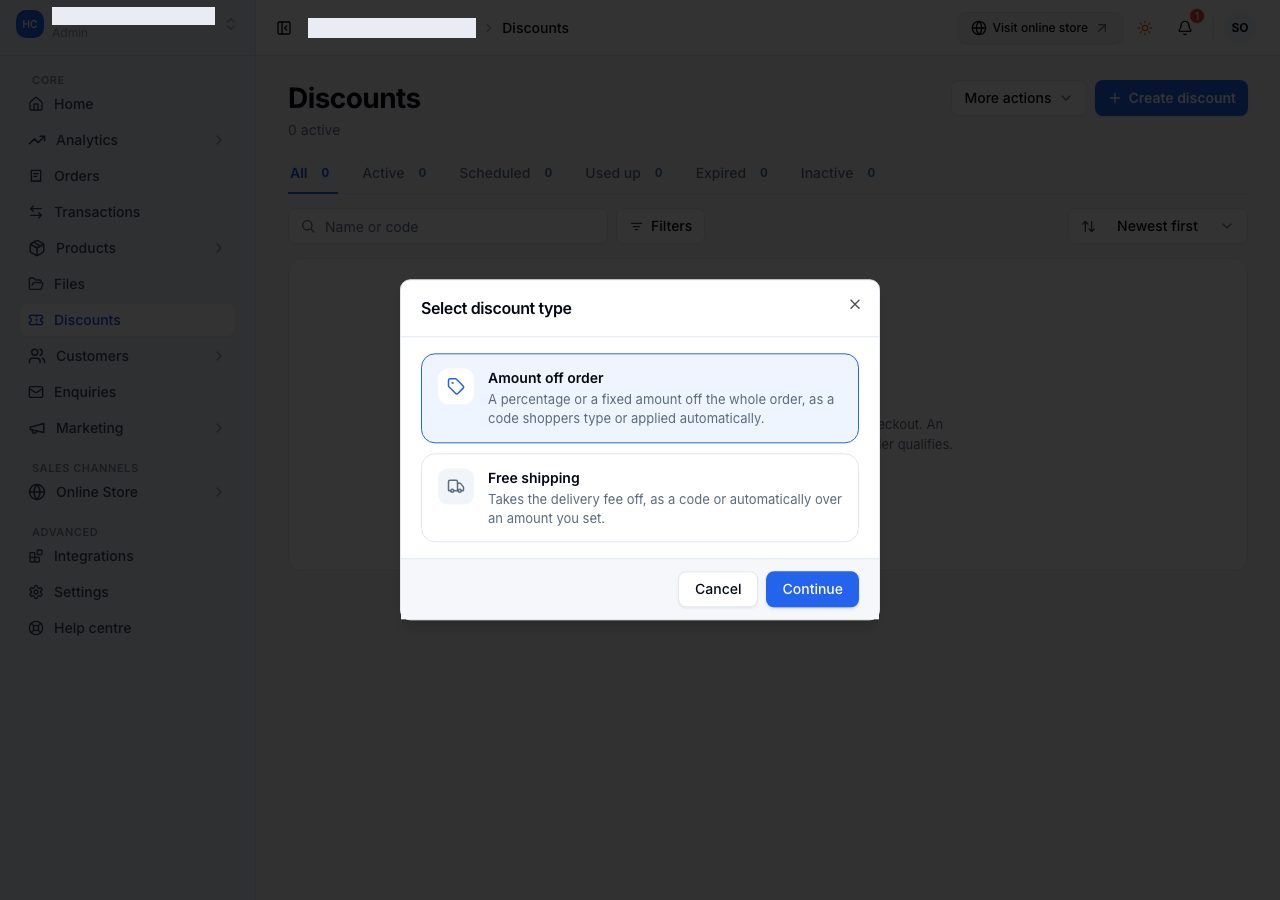
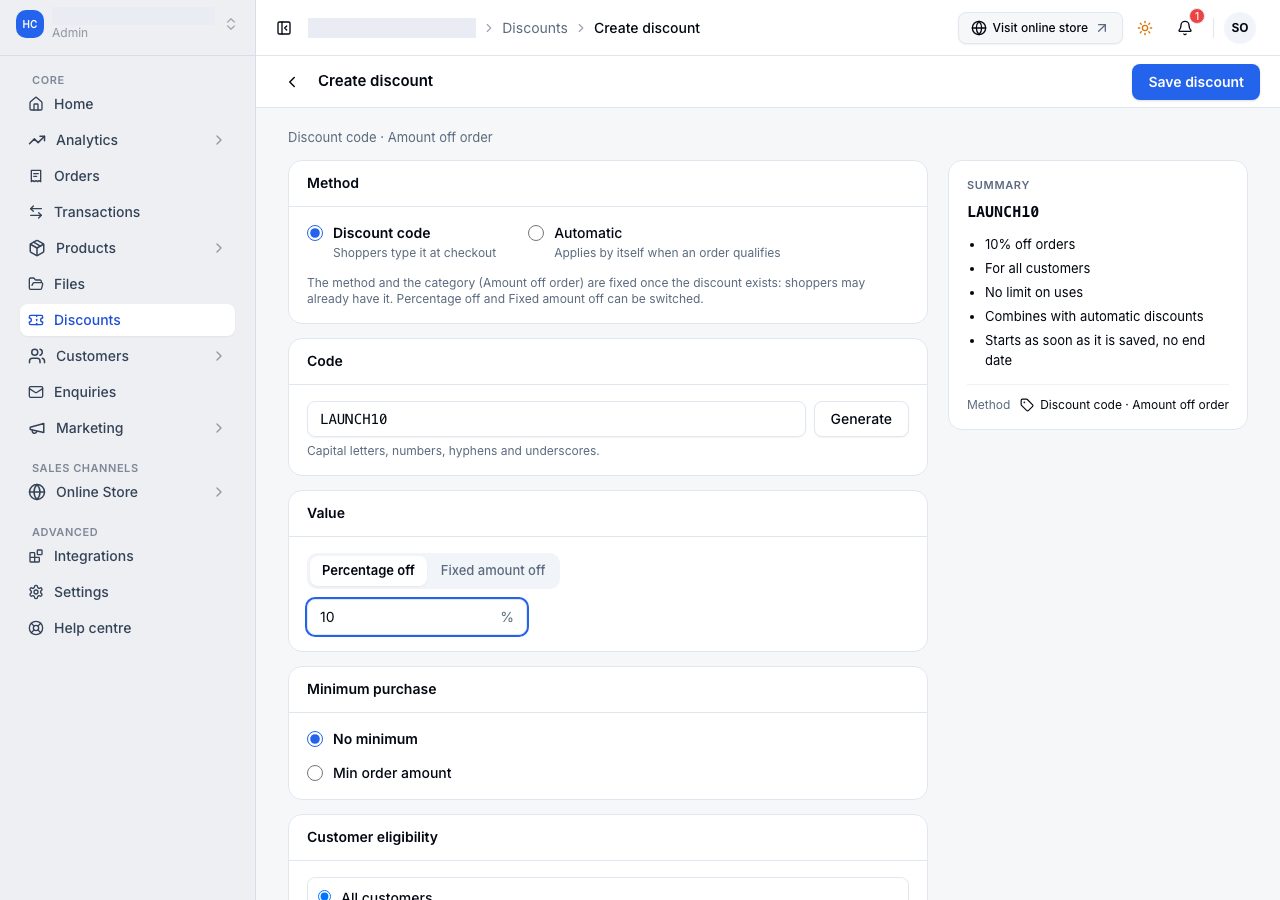
Then the editor asks, with a summary beside it of exactly what you are about to offer:
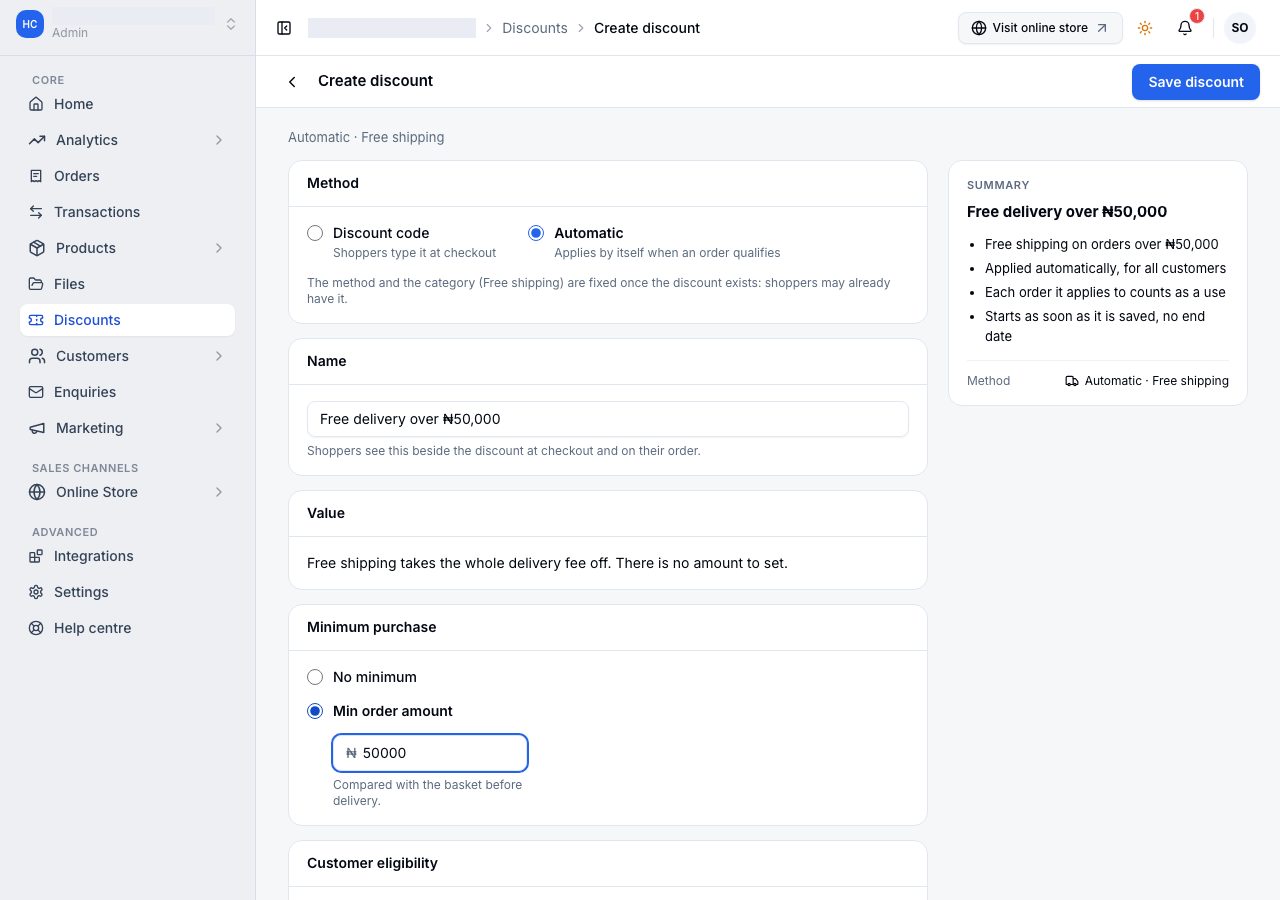
- Method: Discount code or Automatic.
- Code (a code's own): what the shopper types. Capital letters, numbers, hyphens and underscores, or Generate one.
- Name (an automatic discount's own): what the shopper sees beside the discount at checkout and on their order, so write it for them.
- Value: Percentage off (at most 100) or Fixed amount off.
- Minimum purchase: No minimum, or a Min order amount. It is compared against the basket before delivery, so a delivery fee never pushes an order over your threshold. For most discounts the basket counted is the items the discount can come off; for free shipping it is everything in the basket, flash sale items included, because free delivery takes nothing off their price.
- Who can use it, below.
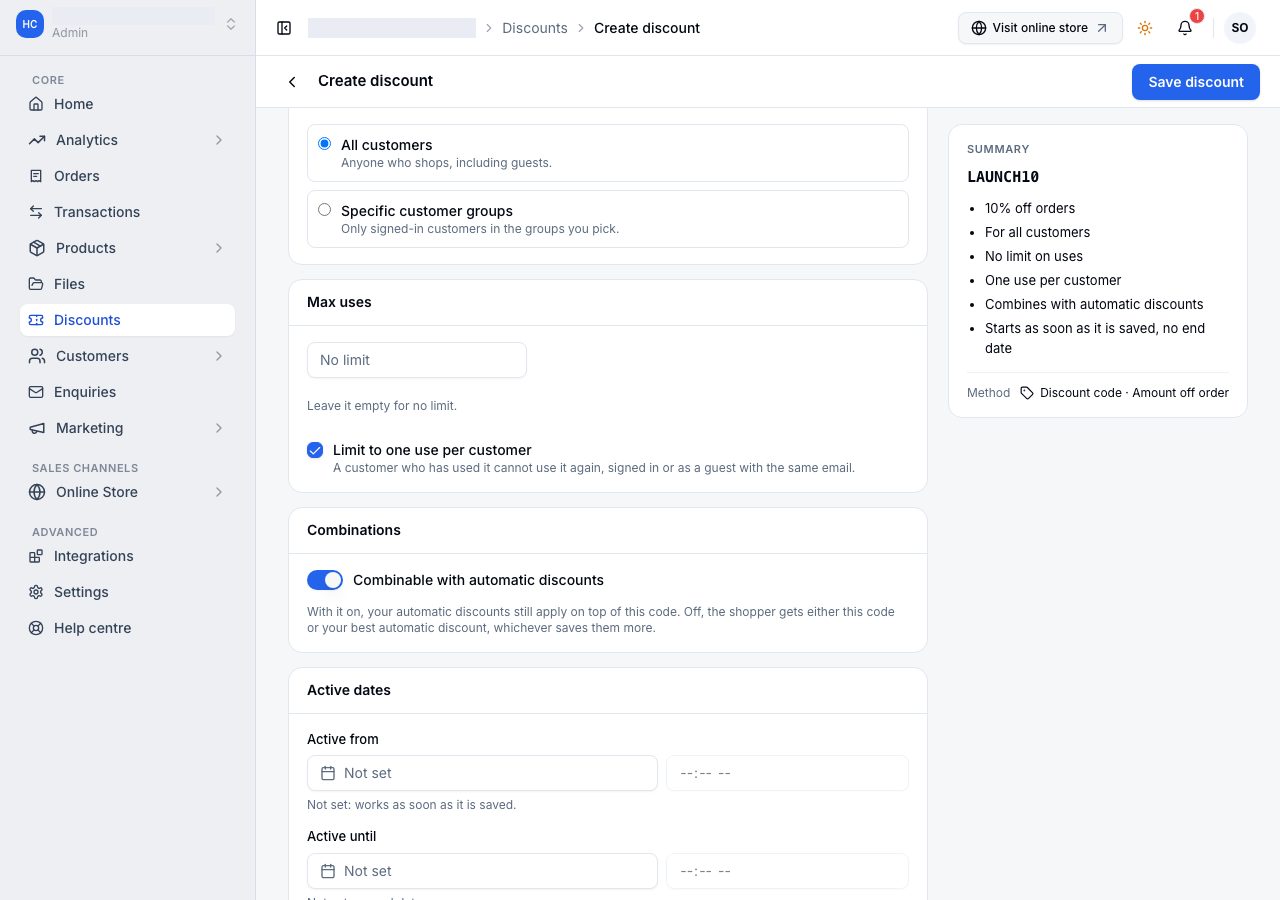
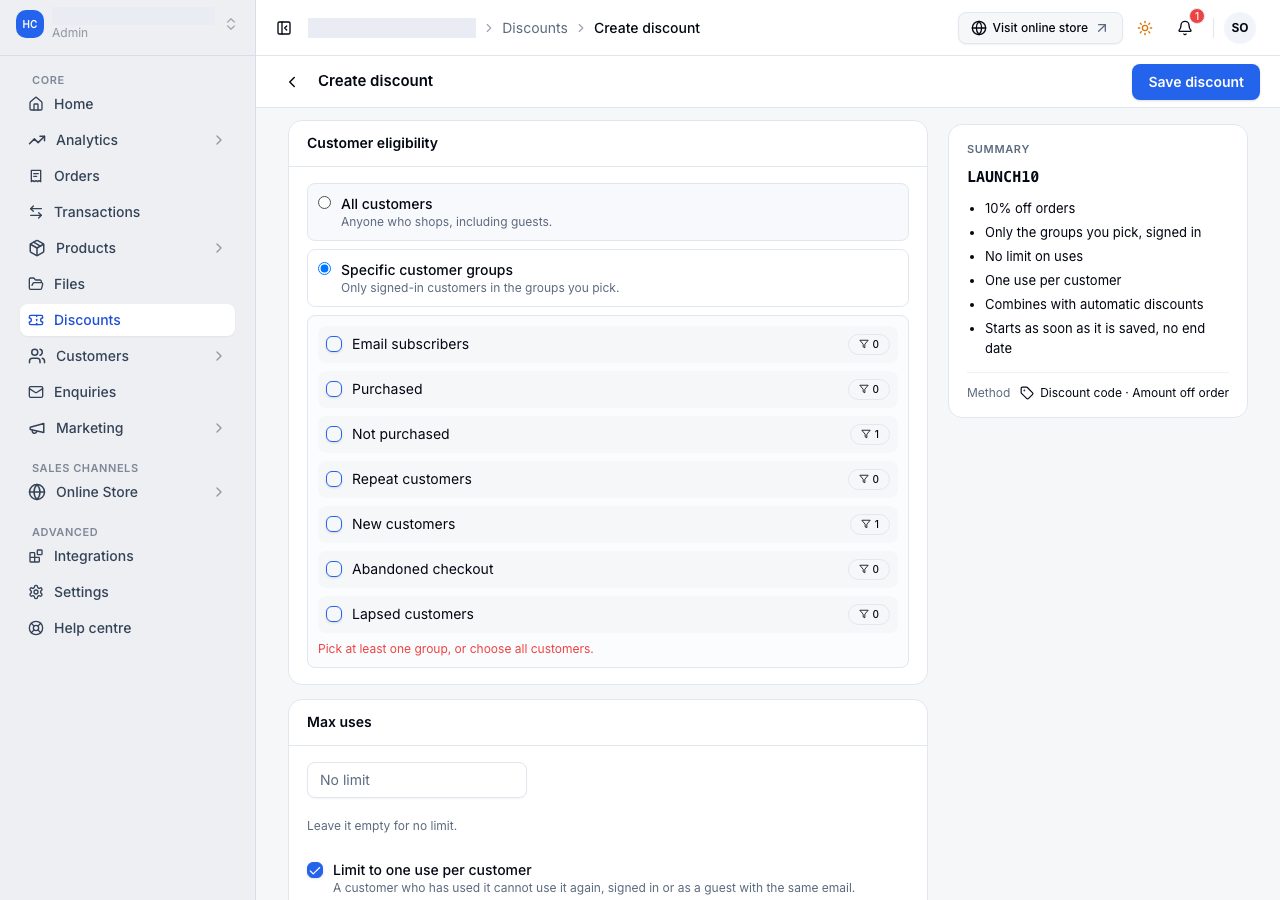
- Max uses (a code's own): empty means no limit. Limit to one use per customer stops a customer using the code a second time, whether they are signed in or check out as a guest with the same email.
- Combinations: a code's Combinable with automatic discounts is on by default, and your automatic discounts apply on top of the code. Turn it off and the shopper gets either the code or your best automatic discount, whichever saves them more, and checkout tells them which applied and why.
- Active dates: Active from and Active until, each a day picked from the calendar and an optional time, on your store's timezone, which the page names. Leave the start empty for a discount that works as soon as it is saved, and the end empty for one that runs until you switch it off. An end with no time runs to 23:59 that day.
Choose Save discount. The method and what it takes off (amount off or free shipping) cannot change once it exists, because shoppers may already have it; within an amount off, you can switch between a percentage and a fixed amount. To remove an end date or a usage limit later, empty the field and save.
More on a saved discount offers Duplicate (a new, unsaved copy with the same terms, and no code or dates), Activate or Deactivate, and Delete.
Who can use it
All customers is anyone who shops, guests included.
Specific customer groups limits it to signed-in customers in the groups you pick, with each group's size beside it. Somebody outside them is told the code is not available on their account, and never which group they are missing, because how you segment your customers is not the shopper's business.
Every store has default groups to pick from (Repeat customers, Lapsed customers and the rest), beside any you make. See Customer groups.
Share it
A saved discount code has Share beside More. It opens a message written for you, with the code, what it takes off and a link to your online store. Change it however you like, then share it on WhatsApp, Instagram, Facebook or X, or Copy link. On a phone, Other apps opens your phone's own list for anywhere else.
WhatsApp and X open with your whole message. Facebook and Instagram cannot start a post with your words: Facebook's share page takes only a link, and Instagram has no share page. So pressing either copies your whole message, its link included, and says so: Facebook then opens with the link, ready for you to paste the message; for Instagram, paste it into a post or a story, where a link sticker takes the link.
Each way you share sends its own link, which says where it was shared, so an order it brings is credited to the share. Orders from shares, under the summary, counts them: orders and sales by where you shared (a share through your phone's own list shows as Other apps), and a total. An order counts when it is placed within 7 days of a visit through one of your shared links; a later visit through another link takes over, and a visit typed in does not. Sales are what those orders were paid, less refunds, as in Reports, so an unpaid order counts once it is paid. The order itself says where it came from, in its Conversion summary.
A code from a generated batch, and an automatic discount, have no Share: a batch's codes are for one person each, and an automatic discount has no code to give.
Hundreds of one-time codes
More actions, then Generate codes, makes a batch of unique codes at once, for a campaign where each person gets their own: a prefix, how many (up to 10,000), a batch label, and the same value, minimum, Who can use it, combining and dates as a single code. Set Max uses per code to 1 to make each code usable once, and tick Limit to one use per customer so each customer can use one code from the batch, not one of each. If the group you pick has nobody in it yet, the page says so, because then nobody can use the codes.
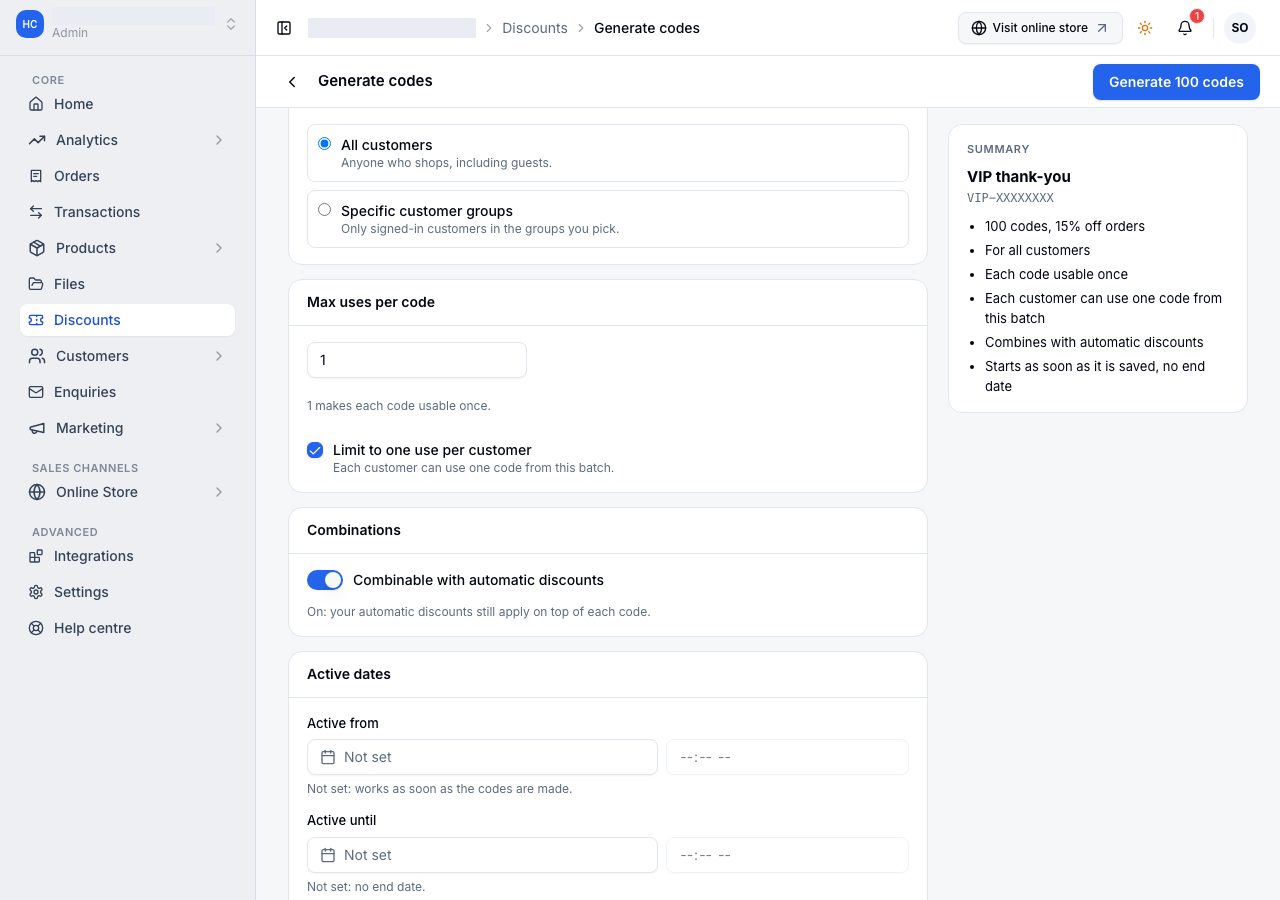
A batch is one row in the list. Open it to see every code with its own status and copy any of them; if its codes differ, the row shows how many are in each state. Searching for one code finds its batch and opens it on that code.
Every code in a batch shares the same terms, so they are changed together: Edit terms on the batch changes the value, minimum, who can use it, the limit per code and the dates for every code at once. A single code from a batch shows its terms but cannot change them; it can still be switched off, duplicated or deleted on its own. Delete batch removes every code in it, and says how many first.
If it does not work
- A shopper's card payment failed, or they left the payment page: the code is not used up. It is given back, and is back in their basket when they return to checkout, unless they have changed or removed it since. A payment still unanswered after a day is checked with the payment provider again, and its code is given back once the provider confirms it failed or expired.
- A code shows more uses than its limit: a payment that arrived late, after the shopper's code had been given back, still counts, because they were charged with the discount. The order's timeline says so. The same goes for one use per customer.
- A shopper is told they have already used this discount: the code is limited to one use per customer, and they used it, or on a batch another code from it. A use whose payment failed does not count. If they are told it is being used in another checkout, a payment of theirs with it is still in progress, and if that payment fails they can use it again.
- A code stopped working while a shopper was checking out (it expired or ran out): they are told which code was removed and why, and shown the new total before they pay. Nothing is charged until they place the order again.
- A shopper says the code is not accepted: check its status in the list, that their basket meets the minimum, and, if it is limited to groups, that they are signed in and in one.
- A code says Active but a shopper cannot use it: Active means the code is on, started, not ended and not used up; the basket and the shopper still have to qualify.
- The code applied but nothing came off delivery: an amount off comes off the basket, not the delivery fee. Free shipping is the type that removes the delivery cost.
- The checkout showed a different automatic discount from the basket: a free delivery discount is worth the delivery fee, which is only known once the shopper picks how they get their order. Until then it reads Free delivery at checkout, and the checkout settles which of your automatic discounts saves the shopper most before they pay.
- A shopper's code says Not applied: the code has Combinable with automatic discounts off, and an automatic discount their basket qualifies for saves them more, so that one applied instead. The checkout says what each saves. Nothing of the code was used: it does not count towards its limit, it stays in their basket, and it applies if the basket changes so that it saves more. A code also shows Not applied when it saves nothing on the order, whether or not it combines: a free shipping code on a pickup order, a basket where every item is in a flash sale that does not allow discounts, or an automatic discount that has already taken everything the items allow. It is not used up.
- An automatic discount stopped applying when a code was used: the code has Combinable with automatic discounts off and saved the shopper more than any automatic discount, so it applied on its own.
- A discount will not apply to a sale item: an item in a flash sale is excluded from codes and automatic discounts unless that sale has Allow discounts on sale items on, so refunding it gives back exactly what the shopper paid for it. An add-on bought with it decides for itself, so a discount can still come off the add-on. See Flash sales.
- A code and an automatic discount together came to less than both: between them they never take more than the items they apply to. The automatic discount comes off first and the code takes what is left, and the order shows what each actually took.
Email support@shoponent.com with your store name if anything here does not match what you see. We read and answer every message.