Available on Professional and Scale · Updated 22 October 2026
Also asked as: “abandoned cart” · “abandoned checkout” · “recovery emails not sending” · “customers leaving without buying” · “cart reminder” · “payment not completed”
A shopper fills a basket, gets as far as giving you an email address, and then stops. Marketing → Abandoned checkouts lists those checkouts, and can email the shopper a link that puts the basket back.
It is on Professional and Scale; see the pricing page.
The list
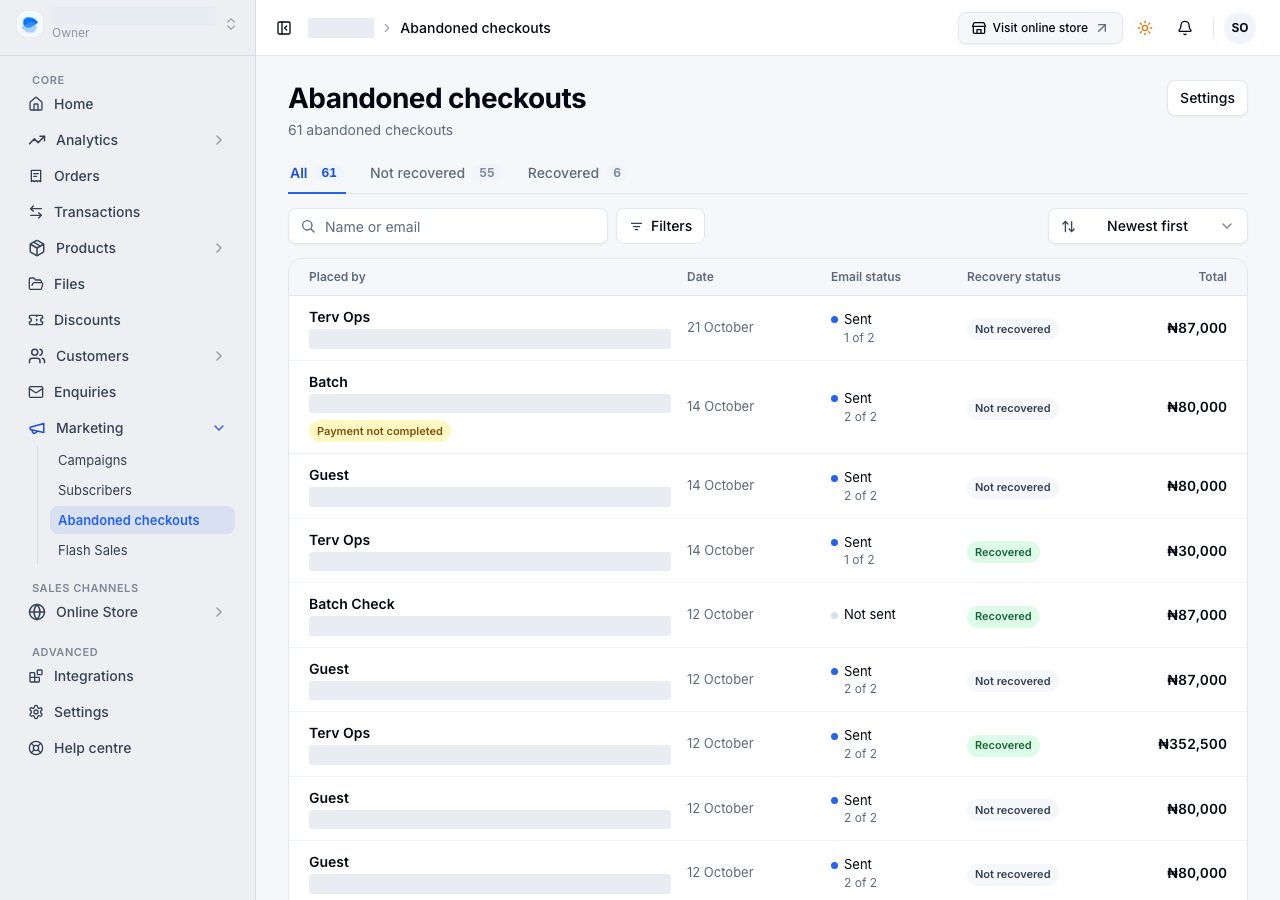
The views are All, Not recovered and Recovered, each with its count. Each row shows:
| Column | What it says |
|---|---|
| Placed by | the shopper's name, or Guest, and their email. Payment not completed means they reached the payment and did not finish it. |
| Date | when the checkout was left |
| Email status | Sent, with how many of your emails went (1 of 2), or Not sent. No email under it means the address is one we never send to; Unsubscribed means the shopper turned the reminders off. |
| Recovery status | Recovered once they came back and ordered, else Not recovered |
| Total | the basket's own total, before delivery and tax, because at that point neither has been worked out |
Search by name or email, narrow with Filters (whether an email went, and how recent), and sort by newest, oldest or highest total. A checkout placed by one of your customers opens that customer.
What gets recorded
Only a checkout with an email address on it. Somebody browsing anonymously is invisible to us: their basket lives in their own browser and never reaches us. Once a shopper signs in or gets through the contact step at checkout, their checkout can be recorded.
It is recorded once it has sat untouched for longer than Mark a checkout abandoned after, and only if that shopper has not placed an order since that still stands. A card payment the shopper never finished does not count as an order: it is cancelled after the time set for Card payments not completed under Settings → Checkout, and the checkout is recorded and marked Payment not completed, so your reminder can bring them back to pay.
Turning it on
Choose Settings on the Abandoned checkouts page. It opens Settings → Checkout → Abandoned checkouts, where the switches live. While tracking is off, the list says so, with Turn on tracking.
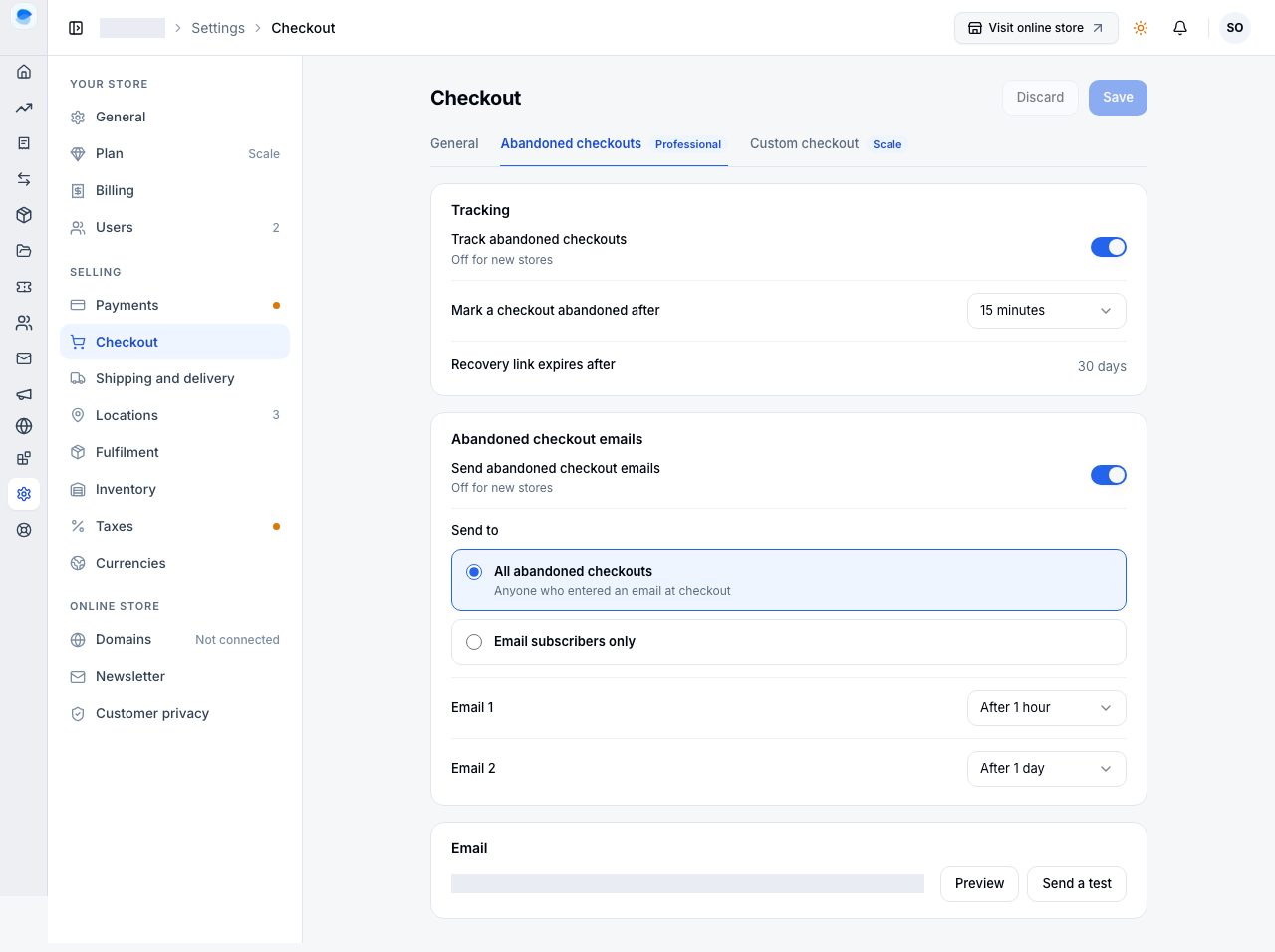
Tracking
- Track abandoned checkouts starts recording. It is off for new stores, and nothing is emailed by this on its own. Nothing from before the day you turn it on is recorded.
- Mark a checkout abandoned after: how long a checkout sits untouched first, chosen from the list (30 minutes to a day; an hour is usual).
- Recovery link expires after 30 days. That is not a setting: a reminder with a dead link is worse than no reminder, so a checkout older than that is not emailed at all.
Abandoned checkout emails
- Send abandoned checkout emails is the switch that sends. It is off for new stores, needs tracking on, and every email carries a one-click unsubscribe.
- Send to: All abandoned checkouts (anyone who entered an email at checkout), or Email subscribers only (people who agreed to your marketing).
- Email 1 and Email 2: when each goes, chosen from the list. An hour and a day are the usual pair, and Email 2 has to come after Email 1.
Choose Save at the top of Checkout. We look for abandoned checkouts every few minutes and send on the same rhythm, so the wait a shopper sees is a little longer than the times you chose.
Email: Preview shows the first reminder as a shopper sees it, made from your latest abandoned checkout (a sample basket until you have one). Send a test sends it to you, at the email you sign in with.
What the shopper gets
An email from your store with what they left behind and a link back to it. Replies go to your store email. Following the link:
- puts the items back in their basket at today's prices and today's stock, and quietly leaves out anything you have since stopped selling;
- takes them to checkout without asking for a password;
- lets them into checkout only. It is not a way into their account: order history, addresses and profile still need their password.
When a checkout counts as recovered
Any order by that shopper that stands: one paid by card, or a bank transfer or pay on delivery order that is not cancelled. A card order counts once its payment is through. If they had clicked the link in a reminder, it was recovered by email; if they came back on their own, it was not. Either way it moves to Recovered.
If it does not work
- The list says tracking is off: choose Turn on tracking, or turn it on under Settings → Checkout → Abandoned checkouts. Only checkouts with an email address are ever recorded.
- Checkouts are listed but no emails go out: Send abandoned checkout emails is a separate switch from tracking. Check it, check Send to (with Email subscribers only, shoppers who never subscribed are not emailed), and check the times are not further away than you think.
- Still nothing: an online store that is offline sends no reminders, because the link would land on a closed shop. See Why your online store is offline. If everything here looks right and reminders still do not arrive, email us.
- Send a test says emails are not switched on for the platform: reminders are not sending anywhere yet; email us.
- A shopper says the link no longer works: it is older than 30 days, or they have already used it and then emptied the basket.
- The recovered basket is a different price: it is re-priced at today's prices on purpose, so you never sell at a price you have since changed.
- Someone unsubscribed: that is for one checkout, not for ever. A new abandoned checkout can be reminded again, unless you send to Email subscribers only and they have also left your list.
Email support@shoponent.com with your store name if anything here does not match what you see. We read and answer every message.