Available on every plan · Updated 22 October 2026
Also asked as: “active sessions” · “sign out of other devices” · “signed in somewhere I do not recognise” · “lost my phone signed in” · “remove an account from this browser”
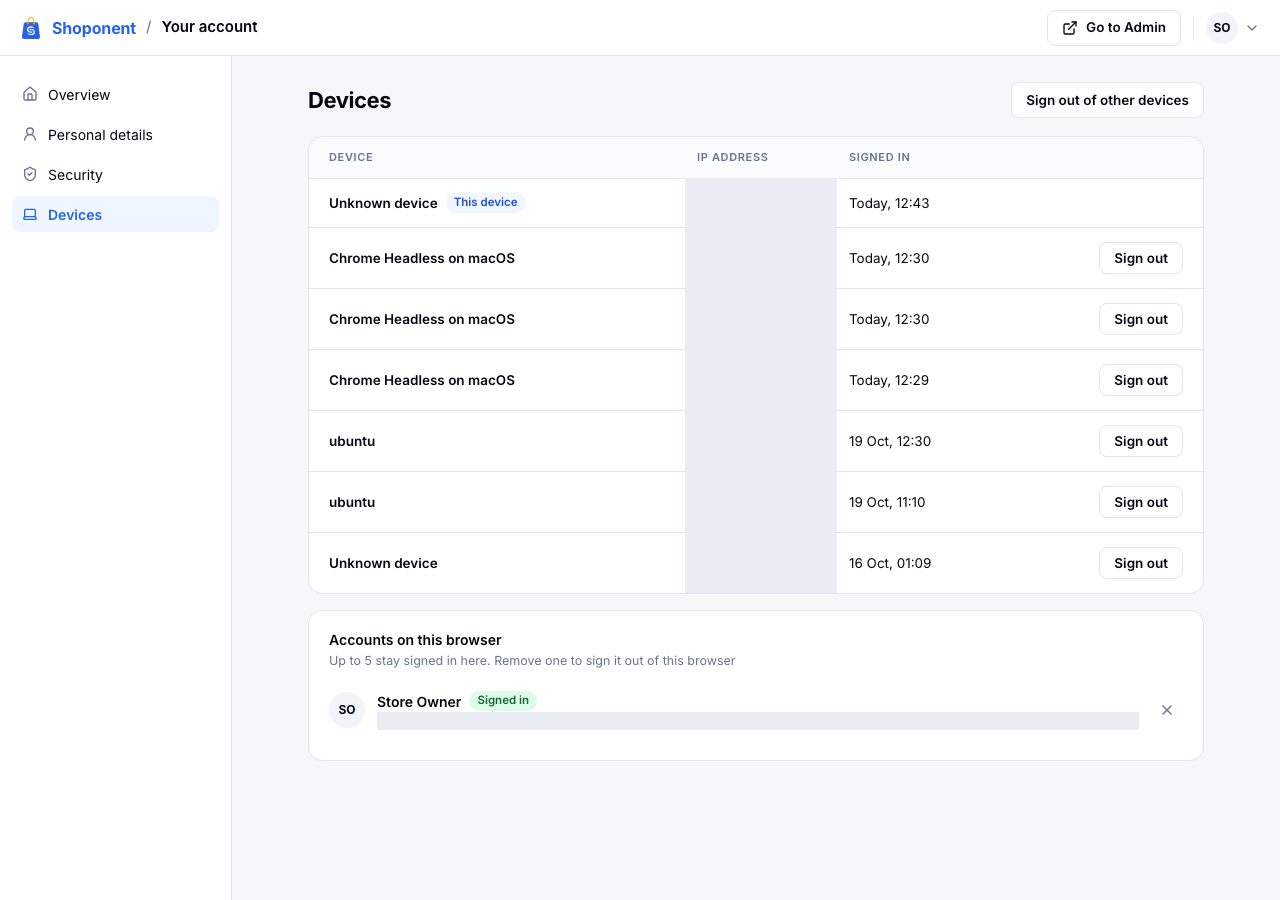
Your account → Devices lists every device your account is signed in on: what it is (the browser and system, where we can tell), its network address, and when it signed in. The one you are using is marked This device.
Sign out one device
Choose Sign out on its row. Within moments that device is signed out, and the next thing it does asks it to sign in again.
Sign out of every other device
Choose Sign out of other devices at the top. Every device except the one you are using is signed out. Do this if you signed in on a computer that is not yours, or think someone else knows your password, and then change your password on Security too; changing it signs you out everywhere else as well. See Your account, password and two-step verification.
Accounts on this browser
One browser can hold several accounts at once, for example yours and a store you help with under another address. Accounts on this browser lists them; the one in use is marked Signed in. Remove one with the cross beside it, which signs it out of this browser only. To move between them in Admin, use Switch account in the account menu; see Switch between stores and accounts.
If it does not work
- A device you do not recognise: sign it out, change your password, and turn on two-step verification so a password alone is not enough.
- A device keeps coming back: someone has your password. Change it, and turn on two-step verification.
Email support@shoponent.com if anything here does not match what you see. We read and answer every message.