Available on every plan · Updated 14 October 2026
Also asked as: “customer did not get an email” · “track my order” · “customer cannot find their order” · “customer did not get a sign-in code” · “order confirmation email” · “customer wants their receipt” · “customer says order still says preparing” · “part of the order arrived” · “item status on the customer's page” · “stop the customer being emailed” · “someone else has the order link” · “customer cannot see their receipt on the order link” · “customer sent the wrong transfer receipt” · “who is the order link for”
Two things reach your customer: an email about their order, sent once there is something to confirm, and a page they can open any time without signing in.
Straight after checkout
A bank transfer goes first to the transfer page, which is theirs alone: your bank details, the exact amount, the order number to quote, the receipt upload, a countdown when you hold transfer orders for a set time, and, quietly, Pay another way and Cancel order. Once the receipt is sent it says Receipt sent, with View order. See Accept manual bank transfers.
Every other order goes to the confirmation page, which thanks them, lists the order and offers one button, named for where it goes. A customer signed in to an account gets View order, which opens it in their account. A guest gets Pay now while they still owe you online, and Payment status once they have sent a transfer receipt. Once an order is paid, and for a guest paying on delivery or at pickup, there is no button, only the offer to create an account and follow the order in it: the receipt is in their account and in the payment received email.
The confirmation email
When it goes depends on how they pay:
- card or a payment provider (Paystack, Monnify, Stripe): there is none. The payment received email, with the order and their receipt, is the one email, and it goes once the payment is through. A payment never finished sends nothing: the order is cancelled after your reservation time, its stock goes back, and the cart counts as abandoned, so your abandoned cart email can reach them;
- bank transfer: when they send the receipt, or 30 minutes after the order if they have not;
- pay on delivery: as soon as the order is placed.
It arrives from your store, with your name on it, and replies come to you. It carries:
- everything they bought, with quantities and line totals;
- the subtotal, delivery, any discount and the total, with the tax shown as part of that total;
- anything they typed at checkout, and their own note;
- a line about what happens next: for a bank transfer, that you will confirm the order once you have checked their transfer; for pay on delivery, that they will pay when it arrives, or when they collect it;
- for a bank transfer with no receipt yet, no button: they may well have paid already, so a line offers the order's link instead, If you have not sent us your transfer receipt yet, send it here. When you hold transfer orders for a set time it also says when the receipt is due, and that the order is cancelled if none arrives by then;
- otherwise a View your order button, which opens the order in their account.
Their receipt, or tax invoice, comes in its own email once the payment is confirmed.
The order link is for paying
Every order has its own link that needs no account. It is where a customer pays: the invoice while money is owed, with the ways to pay you have set up, then Confirming payment while you check a transfer receipt, and Payment received once it is paid, with the amount, how they paid and when. When the order is held for a set time (an invoice's due date, or your transfer hold), the page counts down to it, to the second. The emails use it only while there is something to pay.
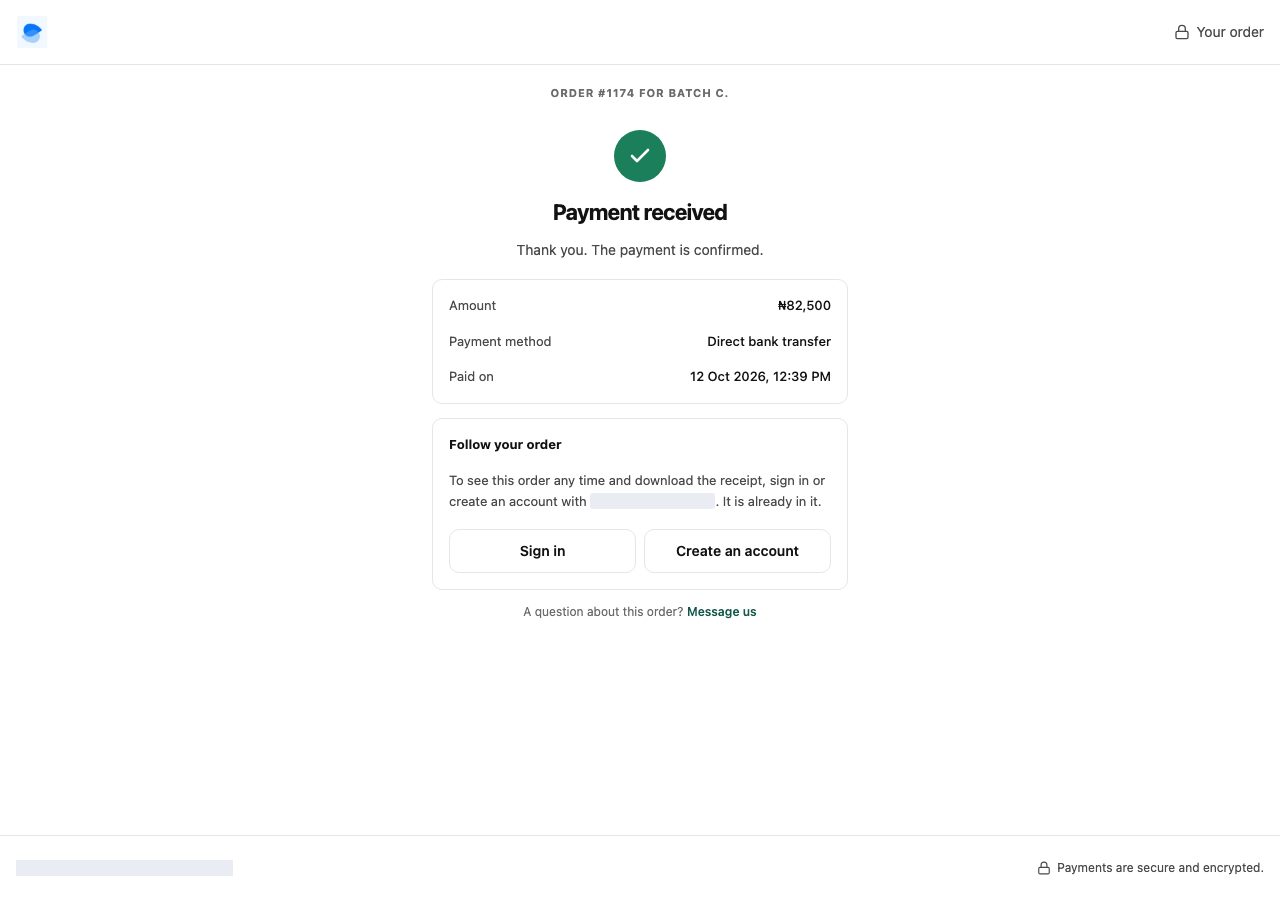
It does not show the order itself, and it does not offer the invoice or receipt to download: following an order is what the customer's account is for, and you can always send the document from the order.
The same page for everyone
You or your customer may forward the link to whoever pays, so it shows everyone the same thing, and only what paying needs: whose bill it is (their first name and an initial, such as "Ada O.", and the area it goes to), that it is paid to your store, what is in it, the total, how to pay you and where the payment stands. Anyone can pay, and send you the first transfer receipt, which you check against your bank as always.
Your customer's full name and address, the receipt they sent, replacing it, and the invoice or receipt are in their account. Once a receipt is in, and once the order is paid, the page ends with Follow your order: sign in or create an account with the email the order is under, shown partly hidden (such as te••••s@gmail.com), and the order is already in it. A customer signed in to that account gets See it in your orders; signed in to a different account, they are asked to sign in to the one the order is under.
An order with no email on the customer, such as one you typed in with a phone number only, has no account to point to, so the page ends at the payment. You can download its invoice or receipt from the order and send it.
Following the order in their account
Signed in, a customer sees each order, what it cost, where it is going, and one word for how far along it is. It says how they paid and where the money stands: paid, not yet paid, or how much you refunded, and a cancelled order says whether nothing was charged, the money went back, or a refund is still due from you. An order still waiting for an online payment says so at the top, with Pay now; a bank transfer says "We are waiting for your transfer", with Send your receipt, and once the receipt is in, that you are checking it, with View your receipt. A customer who sent the wrong one can replace it once, from the order in their account, until you confirm the payment; you keep both. An exchange on the order sits at the top of it, with a way to pay the difference when they owe one (see Exchange a return). A shopper who checked out as a guest creates an account with the email they ordered with: we email a code to that address to make sure it is theirs, and once they enter it the orders they placed are already in the account. The confirmation page, the payment page and the emails offer this.
| They are told | When |
|---|---|
| Awaiting payment | nothing has been paid yet |
| Confirming payment | they have sent you a transfer receipt and you are checking it |
| Preparing | you have accepted the order and are packing it |
| Partly sent or Partly ready | some of it has gone and some has not |
| On its way | it has left you, with the carrier and tracking number if you added them |
| Ready for pickup | it is on your shelf waiting for them |
| Delivered or Picked up | they have it |
| Cancelled or Refunded | it stopped |
These are deliberately not the words you see. You are scanning a queue; they have one order and want the thing that just happened to it.
Each item says where it has got to as well, which is the only honest answer on an order you are sending in pieces: one line can read Delivered while the line under it reads Preparing, and a line you have part-sent says so and shows how many of how many. One word for the whole order cannot carry that, which is why the order word stops at "Partly sent" and the detail sits on the items.
If the order is still unpaid, its link is the invoice: what is owed and by when, and the ways to pay you have set up, including your own Paystack or Monnify, or your bank details for a transfer with its receipt. See Send an invoice and get paid.
The emails you send by working the order
You do not send any of these by hand. They go out when you do the work, unless you untick Email the customer on the step:
- starting to pack tells them you are preparing the order, which on an unpaid order is also how they learn you have accepted it;
- marking a parcel on its way tells them it has left, with tracking if you filled it in;
- marking it ready for pickup tells them where to collect it and when you are open;
- delivered or picked up closes it off.
One email goes out by itself: payment received. When an order is paid, however it was paid, the customer is told within a couple of minutes, with their tax invoice or receipt attached and a link to the order in their account. It comes from your store.
The order confirmation, the payment received email and the order in their account all say what a price compared with when it was sold, in words rather than a struck-through number: before the sale for a flash sale price, on its own for an add-on bought at its add-on price, bought separately for a bundle.
Marking a parcel on its way links the carrier's tracking page when you add a tracking link, and the order in their account otherwise. When you record a payment yourself, Email the customer on that step decides it, as above.
Cancelling a parcel deliberately sends nothing: it is usually a correction, and "your order was un-shipped" alarms people without the context you have.
Every one of the steps above asks you to confirm first, and the box has Email the customer ticked. Untick it when the news would reach nobody: a counter sale the customer has already walked out with, or a delivery they confirmed by phone last week. The order records the step either way; only the email is held back. It comes back ticked the next time, because silencing one step is not a decision about the next.
Checking what was sent
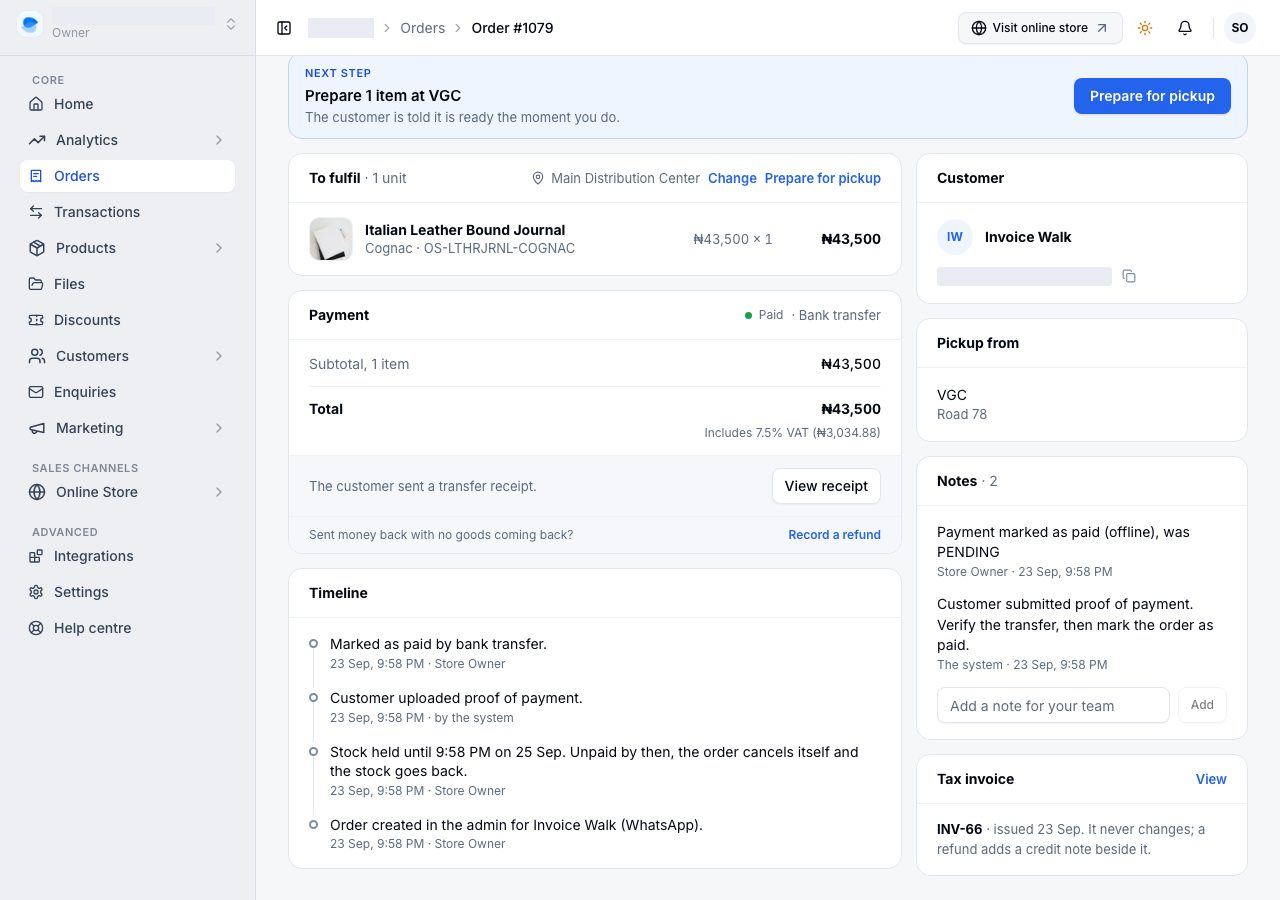
The order's Timeline records what happened and who did it, including the invoice when you send one (older orders say payment link), the receipt when it is emailed, and the moment a customer uploads a transfer receipt.
If it does not work
- They say no email arrived: ask them to check spam, and check the address on the order. An address with a typo cannot be delivered to, and the order is still perfectly good; correct it with them and share their receipt yourself.
- They cannot find their order: they sign in to their account on your store. A guest creates one with the email they ordered with, enters the code we email to it, and their orders are already there.
- You sent the order's link to the wrong person: it shows them only the bill, whose it is and how to pay you, never your customer's address or receipt. If you do not want it paid, cancel the order: the link then says it was cancelled and takes no payment. Create the order again for the right person and send them its link.
- The sign-in code never arrives: it comes from your store, so ask them to check spam and promotions. They can ask for a new one after a minute, and each code works for 10 minutes.
- They sent the wrong transfer receipt: they replace it once from the order in their account, until you confirm the payment. The order's link does not offer it, because anyone holding the link could. After that it is a conversation: confirm the payment once the money is in your bank, whatever the receipt shows. For an exchange's difference, reject the receipt on the order and they can send another.
- A walk-in wants their receipt later: they gave no email, so nothing was sent. Share it from the order in your dashboard.
- They ask where their parcel is: their account shows how far along the order is, and how far each item has got. The tracking link you add when you mark a parcel on its way goes to them by email; their account does not show it yet. We do not track parcels ourselves.
- They want to pay by card: they can, from the order's link or Pay now on the order in their account, while it is unpaid, through the Paystack or Monnify account you connected. If neither is set up, the page asks them to get in touch with you.
- They want an invoice: it is attached to the payment received email, and in their account. You can also send it from the order. See Invoices and receipts.
Email support@shoponent.com with the order number if anything here does not match what you see. We read and answer every message.